Static Routing
There are generally 2 types of routing: Static and Dynamic routing.
Static routing is when a router uses a manually-configured routing entry; While Dynamic routing is when a router automatically determines the route based on the conditions.
Static routes are fixed and will not change, until another manual configuration is applied.
Configure Static Routes in Packet Tracer
Note
You can download the example network here.
We can leverage Packet Tracer's interface to configure our network.
Setting the Endpoints
Open one of the endpoints.
Go to Desktop > IP Configuration, and configure its IPv4 Address, Subnet Mask, and Default Gateway.
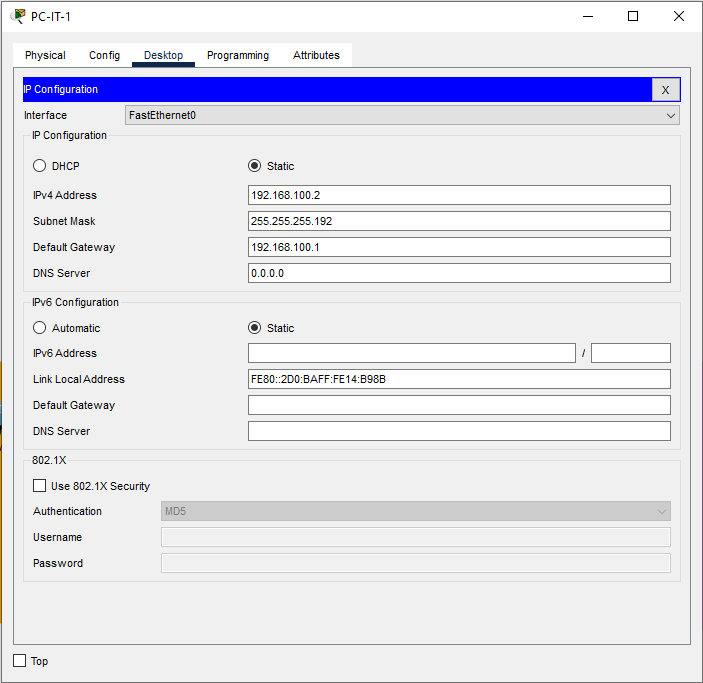
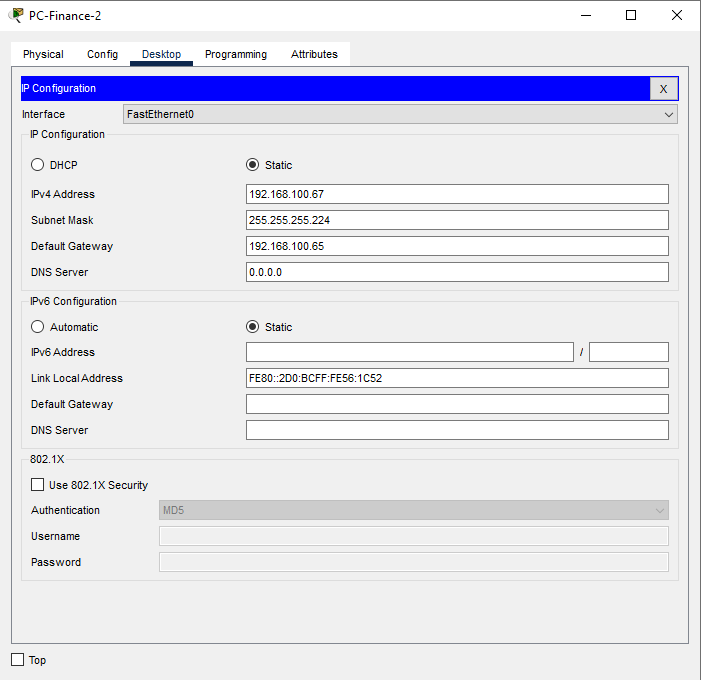
Setting the Router
Open one of the routers.
Go to Config, open one of the interfaces, and configure its Port Status, IPv4 Address, and Subnet Mask.


Note
To determine which interface connect to which network, you can enable port labels by going to Options > Preferences > Interface and activate Always Show Port Labels in Logical Workspace.
Applying Static Routes
To apply static routes, we have to configure each router.
Open one of the routers.
Go to Config > Routing > Static.
Here, we will determine the hops in order to reach a network.
For example, to reach Finance Network 192.168.100.64/27 from Router 1, we have to 'hop' onto Router 2 192.168.200.34.
The same applies for every other network.

Important
You don't have to configure network that are already included within the gateway itself. For example, you don't have to configure hops to IT Network from Router 1.